---
title: Product custom fields
description: Local Express has the custom fields feature implemented (mostly for the Doordash but also can be used for other partners with the exception of export part). The custom fields feature allows to store,
---
[Skip to content](https://support.localexpress.io/en/knowledge-base/product-custom-fields#main-content)
English
Show submenu for translations

Open main navigation
Close main navigation
- English
Show submenu for translations
- [Contact us](https://share.hsforms.com/14jeRj53eS6iQwfr0Bm8NcQnu1ss)
[Contact us](https://share.hsforms.com/14jeRj53eS6iQwfr0Bm8NcQnu1ss)
How can we help you?
- There are no suggestions because the search field is empty.
1. [Local Express Knowledge Base](https://support.localexpress.io/en/knowledge-base?hsLang=en)
2. [User Guides (Eng)](https://support.localexpress.io/en/knowledge-base/user-guides-eng?hsLang=en)
3. [Catalog](https://support.localexpress.io/en/knowledge-base/user-guides-eng?hsLang=en#catalog)
May 29, 2025
# Product custom fields
#### What Are Custom Fields?
In Local Express, the Custom Fields feature is a flexible way to store additional product information that doesn't fit into the standard catalog structure. These fields act like "extra tags" or data points that can help you enhance your product details for internal tracking, integrations, or even customer-facing information.
Each **custom field** consists of:
- **Field Name** – This is the label or category of the data you want to track (e.g., “Vendor Code”, “Storage Temperature”, “Gluten-Free”).
- **Value** – This is the actual data corresponding to the field (e.g., “ABC123”, “-18°C”, “Yes”).
Custom fields are stored at the product level and can be:
- Manually added or edited via the Partner App
- Imported or exported with regular sync process*.*
#### Custom Fields in the Partner Web To view or configure custom fields for your products, follow these steps:
1. **Log in** to your **LE Partner Web**.
2. Navigate to **Catalog → Products → Store**.
3. From the list of products, **select the product** you want to edit.
4. Scroll down to the **“Additional Information”** section within the product’s details.
5. There, you'll find an interface to **add new custom fields** or **edit existing ones**.
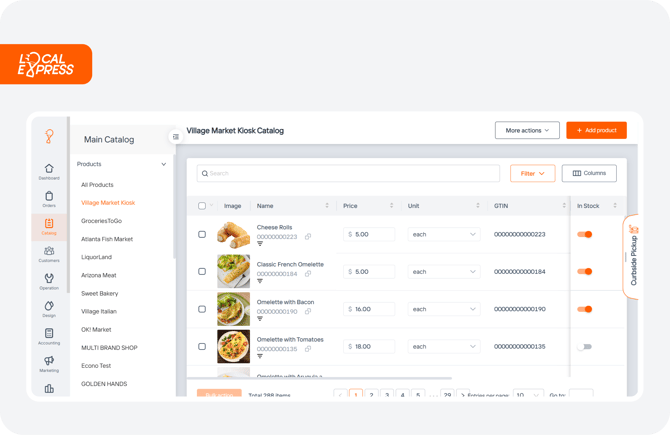
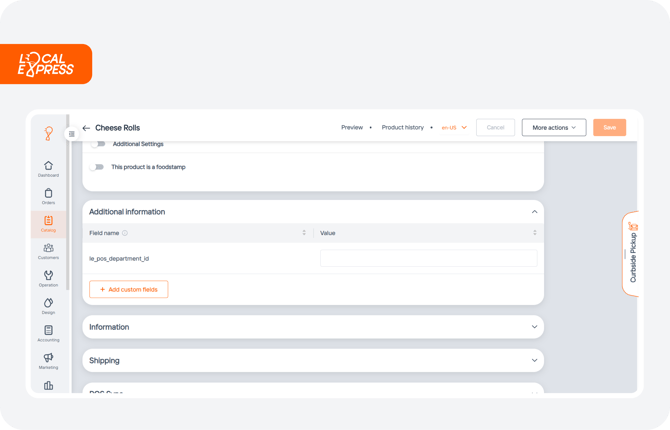
You can add as many fields as you need, and they will be saved with the product. These fields can also appear in **catalog exports**, making them useful for inventory reporting, integrations with external systems, or syncing with third-party services.
#### Use Cases for Custom Fields
Here are some practical examples of how businesses use custom fields:
- **Logistics Info**: Add fields like “Shelf Life”, “Warehouse Location”, or “Handling Instructions”.
- **Supplier Data**: Store vendor codes, minimum order quantities, or manufacturer details.
- **Marketing Tags**: Add descriptors like “Local Product”, “Organic Certified”, or “Holiday Special”.
- **Regulatory Info**: Track compliance fields such as “Contains Allergens”, “Country of Origin”, or “Certification Numbers”.
#### Tips for Effective Use
- Standardize field names across your store to keep your data clean and easy to manage.
- Use clear, descriptive names that your staff or collaborators will understand.
- Limit the number of custom fields only to what’s necessary to avoid clutter.
- [User Guides (Eng)](https://support.localexpress.io/en/knowledge-base/user-guides-eng?hsLang=en#main-content)
- [Orders](https://support.localexpress.io/en/knowledge-base/user-guides-eng?hsLang=en#orders)
- [Local Express Drivers App](https://support.localexpress.io/en/knowledge-base/user-guides-eng?hsLang=en#local-express-drivers-app)
- [Operation](https://support.localexpress.io/en/knowledge-base/user-guides-eng?hsLang=en#operation)
- [Catalog](https://support.localexpress.io/en/knowledge-base/user-guides-eng?hsLang=en#catalog)
- [Design](https://support.localexpress.io/en/knowledge-base/user-guides-eng?hsLang=en#design)
- [Marketing](https://support.localexpress.io/en/knowledge-base/user-guides-eng?hsLang=en#marketing)
- [Kitchen Display System (KDS)](https://support.localexpress.io/en/knowledge-base/user-guides-eng?hsLang=en#kitchen-display-system-kds)
- [Dashboard and Analytics](https://support.localexpress.io/en/knowledge-base/user-guides-eng?hsLang=en#dashboard-and-analytics)
- [Mobile Application](https://support.localexpress.io/en/knowledge-base/user-guides-eng?hsLang=en#mobile-application)
- [Troubleshooting](https://support.localexpress.io/en/knowledge-base/user-guides-eng?hsLang=en#troubleshooting)
- [Billing](https://support.localexpress.io/en/knowledge-base/user-guides-eng?hsLang=en#billing)
- [Reports](https://support.localexpress.io/en/knowledge-base/user-guides-eng?hsLang=en#reports)
- [Customers](https://support.localexpress.io/en/knowledge-base/user-guides-eng?hsLang=en#customers)
- [Apps](https://support.localexpress.io/en/knowledge-base/user-guides-eng?hsLang=en#apps)
- [Profile Settings](https://support.localexpress.io/en/knowledge-base/user-guides-eng?hsLang=en#profile-settings)
- [Onboarding Video Tours (Eng)](https://support.localexpress.io/en/knowledge-base/onboarding-video-tours-eng?hsLang=en)
- [Recorridos en Video de Incorporación (Esp)](https://support.localexpress.io/en/knowledge-base/recorridos-en-video-de-incorporaci%C3%B3n-esp?hsLang=en)
- [Guías de Usuario (Esp)](https://support.localexpress.io/en/knowledge-base/gu%C3%ADas-de-usuario-esp?hsLang=en#main-content)
- [Pedidos](https://support.localexpress.io/en/knowledge-base/gu%C3%ADas-de-usuario-esp?hsLang=en#pedidos)
- [Aplicación de Conductores de Local Express](https://support.localexpress.io/en/knowledge-base/gu%C3%ADas-de-usuario-esp?hsLang=en#aplicaci%C3%B3n-de-conductores-de-local-express)
- [Operaciones](https://support.localexpress.io/en/knowledge-base/gu%C3%ADas-de-usuario-esp?hsLang=en#operaciones)
- [Catálogo](https://support.localexpress.io/en/knowledge-base/gu%C3%ADas-de-usuario-esp?hsLang=en#cat%C3%A1logo)
- [Diseño](https://support.localexpress.io/en/knowledge-base/gu%C3%ADas-de-usuario-esp?hsLang=en#dise%C3%B1o)
- [Marketing](https://support.localexpress.io/en/knowledge-base/gu%C3%ADas-de-usuario-esp?hsLang=en#marketing)
- [Sistema de Pantalla de Cocina (KDS – Kitchen Display System)](https://support.localexpress.io/en/knowledge-base/gu%C3%ADas-de-usuario-esp?hsLang=en#sistema-de-pantalla-de-cocina-kds-kitchen-display-system)
- [Panel de Control y Analíticas](https://support.localexpress.io/en/knowledge-base/gu%C3%ADas-de-usuario-esp?hsLang=en#panel-de-control-y-anal%C3%ADticas)
- [Aplicación Móvil](https://support.localexpress.io/en/knowledge-base/gu%C3%ADas-de-usuario-esp?hsLang=en#aplicaci%C3%B3n-m%C3%B3vil)
- [Solución de Problemas (Troubleshooting)](https://support.localexpress.io/en/knowledge-base/gu%C3%ADas-de-usuario-esp?hsLang=en#soluci%C3%B3n-de-problemas-troubleshooting)
- [Facturación (Billing)](https://support.localexpress.io/en/knowledge-base/gu%C3%ADas-de-usuario-esp?hsLang=en#facturaci%C3%B3n-billing)
- [Reportes](https://support.localexpress.io/en/knowledge-base/gu%C3%ADas-de-usuario-esp?hsLang=en#reportes)
- [Clientes](https://support.localexpress.io/en/knowledge-base/gu%C3%ADas-de-usuario-esp?hsLang=en#clientes)
- [Aplicaciones](https://support.localexpress.io/en/knowledge-base/gu%C3%ADas-de-usuario-esp?hsLang=en#aplicaciones)
- [Configuración del perfil](https://support.localexpress.io/en/knowledge-base/gu%C3%ADas-de-usuario-esp?hsLang=en#configuraci%C3%B3n-del-perfil)
[](https://localexpress.io)
[mailto:email@email.com](mailto:email@email.com)
Copyright © 2026, Local Express